 |
      |
 |
 |
 
|
|
ClickFax Support and Help Linking your accounting system to ClickFax: Step 4 / 16 [ < previous ] [ next > ] 
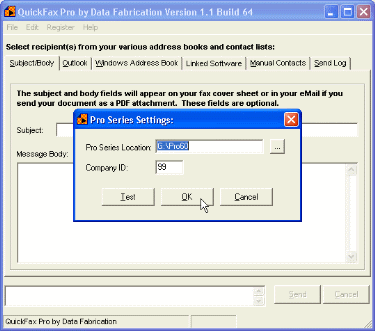
Depending on the linked sofware application you chose in the previous step, you will be presented with a screen that contains any additional link settings. In our example, we have to tell ClickFax where to find the ACCPAC Pro Series installation on the network and as well as the company ID to use. We'll type in G:\Pro60 for the Pro Series location and "99" for the company ID. At this point you can click the "Test" button to test the data connection. Once your connection test is successful, click "OK" to save your Pro Series link settings.
|
|








