 |
      |
 |
 |
 
|
|
ClickFax Support and Help Setting up proxy support for ClickFax: Step 4 / 4 [ < previous ] [ next > ] 
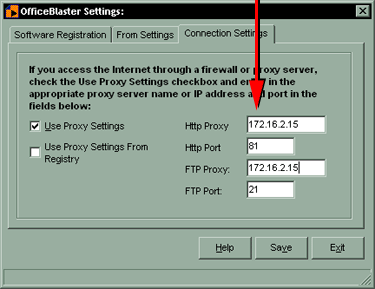
If the four boxes to the right were not filled in automatically on the last step, you need to fill them in manually. Check OFF the "Use Proxy Settings from Registry" checkbox. You need to know your proxy IP address and ports for sending HTTP requests and FTP requests. You may need to contact your system administrator if you do not know these values off hand.
|
|








