 |
      |
 |
 |
 
|
|
ClickFax Support and Help Linking ClickFax to Peachtree Accounting: Step 4 / 9 [ < previous ] [ next > ] 
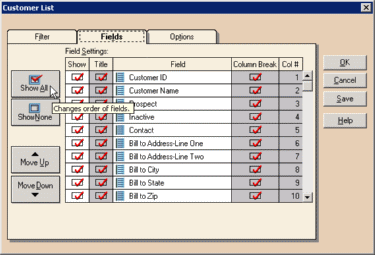
Click the Show All button on the left to export all fields from the Peachtree Customer list. Important: Do not change the default field order of the customer list fields. In addition, you must export ALL customer list fields or else your resulting export file will be incompatible with ClickFax. Finally, click the OK button to create your Peachtree export file. Remember the file name and location of this file because in the next step we are going to import it into Clickfax.
|
|








