 |
      |
 |
 |
 
|
|
ClickFax Support and Help Linking ClickFax to QuickBooks: Step 6 / 12 [ < previous ] [ next > ] 
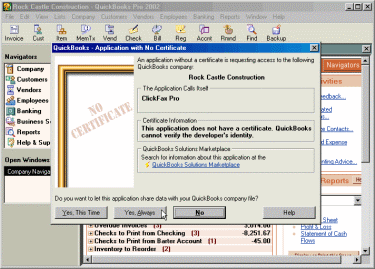
After you select your QuickBooks data file, the QuickBooks program will display a dialog message informing you that an external application called "ClickFax" is attempting to access your QuickBooks data. Click the [Yes, Always] button to allow ClickFax to access your data.
|
|








